MoxiWorks Websites display residential listing data automatically via IDX feed from your MLS. If you would like to include commercial listings for your website and you are a member of a commercial MLS like CBA (WA State only) or LoopNet, you can.
Learn more about membership services:
CBA
LoopNet
Most commercial MLS's provide either an embed code or an iframe code to include in your site. If you're having any trouble finding this, please contact the Customer Service department of the MLS and ask for help. Note: The MoxiWorks Support team will not be able to assist with this.
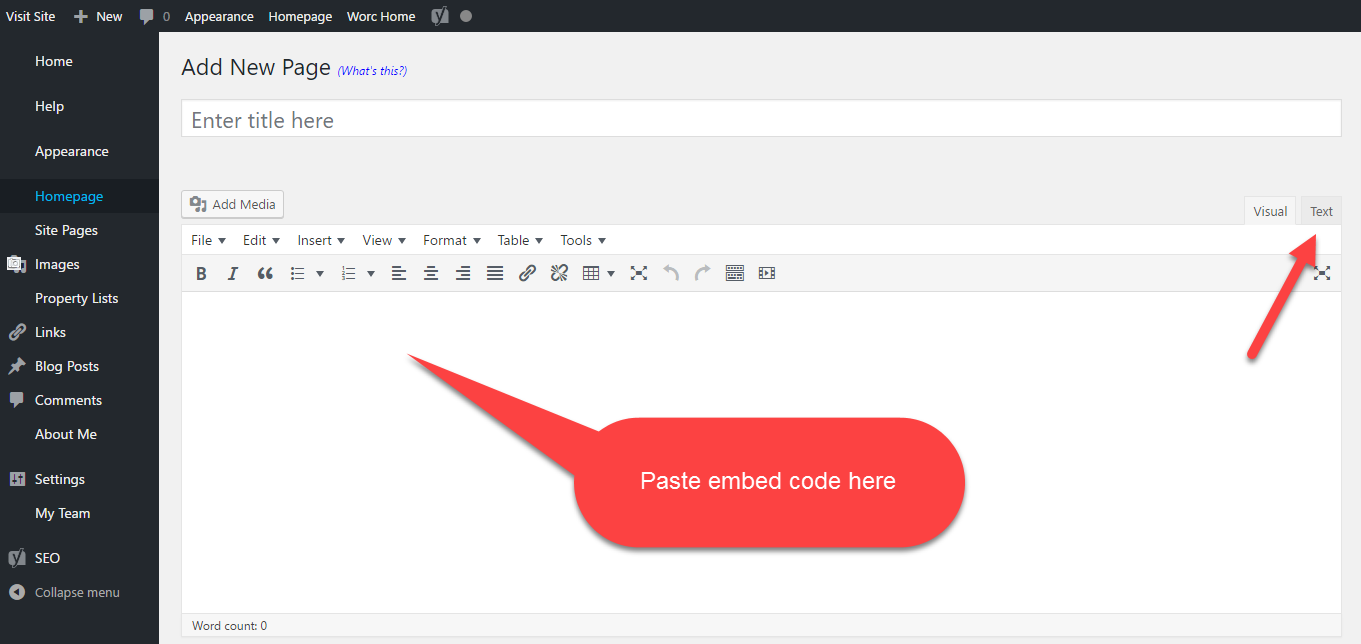
Copy the embed or iframe code from your MLS
Select the "text" tab on your New Custom Page in your MoxiWebsite
Paste your code and select save
CBA
To learn about joining CBA call Member Services at 425-820-3348 or 1-800-275-2522. They can also direct you to additional resources on how to add commercial listings to your website.
LoopNet
Once your membership with LoopNet is established, you need to work with them to sign up for LoopNet.
Comments
0 comments
Article is closed for comments.